DE
Exchange Paysafecard to PayPal, Skrill, Revolut, Payoneer, Neteller, Bitcoin, Litecoin, Ethereum, Tether (USDT), Gram (GRAM). Cash out Paysafecard to Visa & Mastercard card. Bitcoin Exchange. Litecoin Exchange. Ethereum Exchange. Tether (USDT) Swap. » How to Cash Out Paysafecard to Visa or MasterCard (Voucher or Account Balance)


How to Cash Out Paysafecard to Visa or MasterCard (Voucher or Account Balance)
If you want to cash out, exchange or withdraw Paysafecard to a Visa or MasterCard, this page shows exactly how to move money from your Paysafecard voucher — or your Paysafecard account balance (myPaysafe) — onto your bank card. The amount is topped up straight to your card number, with no registration and no long waiting.
A Paysafecard voucher can only be spent at online shops that accept Paysafecard. By exchanging it for a Visa or MasterCard payout, you turn that locked prepaid balance into ordinary money you can spend anywhere cards are accepted, online or in store, or withdraw at an ATM. Here is how it works, step by step.
How to Exchange Paysafecard to a Visa or MasterCard Card — Step by Step
- Choose what you want to cash out: a Paysafecard voucher or your Paysafecard account balance (myPaysafe).
- Enter your 16-digit Paysafecard voucher code — or the email address linked to your Paysafecard account (myPaysafe).
- Select the country where you bought the voucher, or where your Paysafecard account is registered.
- Select the currency of your voucher or balance (EUR, CHF, GBP, etc.).
- Enter the amount you want to cash out.
- Select your preferred Visa / MasterCard payout currency.
- Enter your Visa or MasterCard card number — double-check every digit before you continue.
- Enter the bank account holder's name.
- Enter your bank name.
- Enter your own contact email address.
- Complete the security check (CAPTCHA) and click "Receive Payment Link".
- Wait to be redirected to the payment page automatically — or open the payment link we send to your email.
- Complete the payment on the official Paysafecard website — once confirmed, the money is sent to your card instantly.
Prefer visuals? The slider below walks you through the very same steps in pictures.
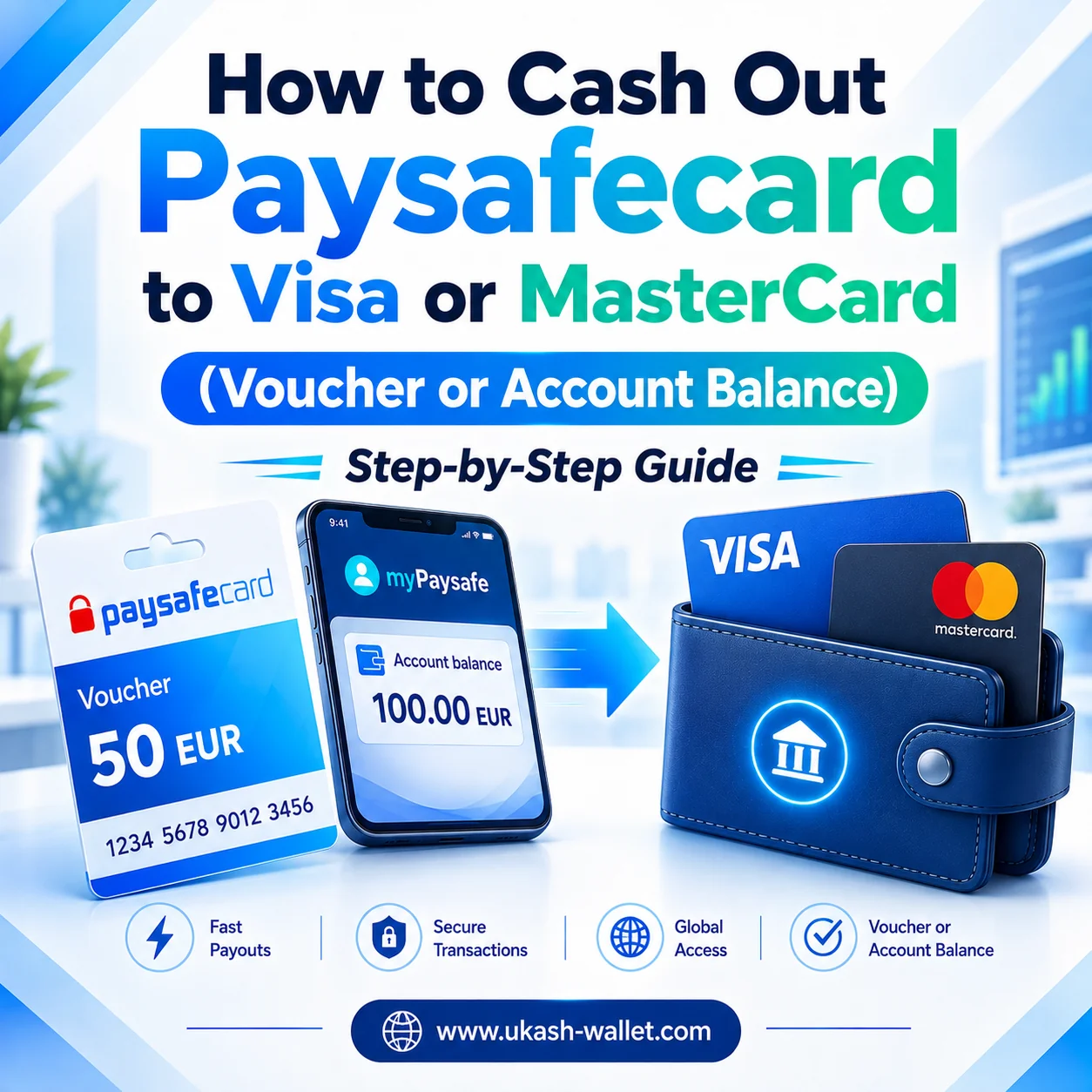
Step-by-step guide to transfer your Paysafecard voucher or account balance (myPaysafe) to a Visa or MasterCard card.
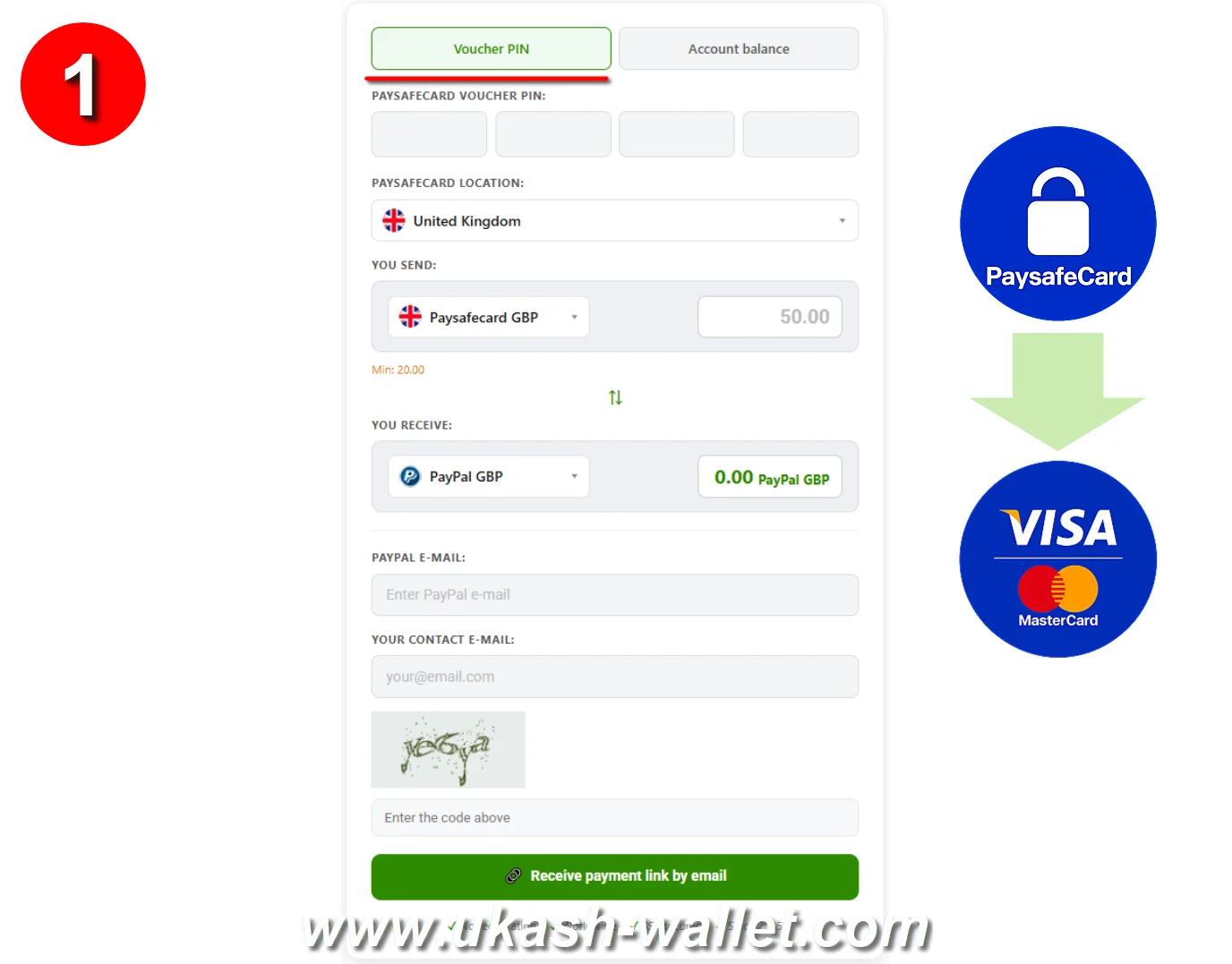
Choose what to cash out: a Paysafecard voucher or your account balance (myPaysafe).
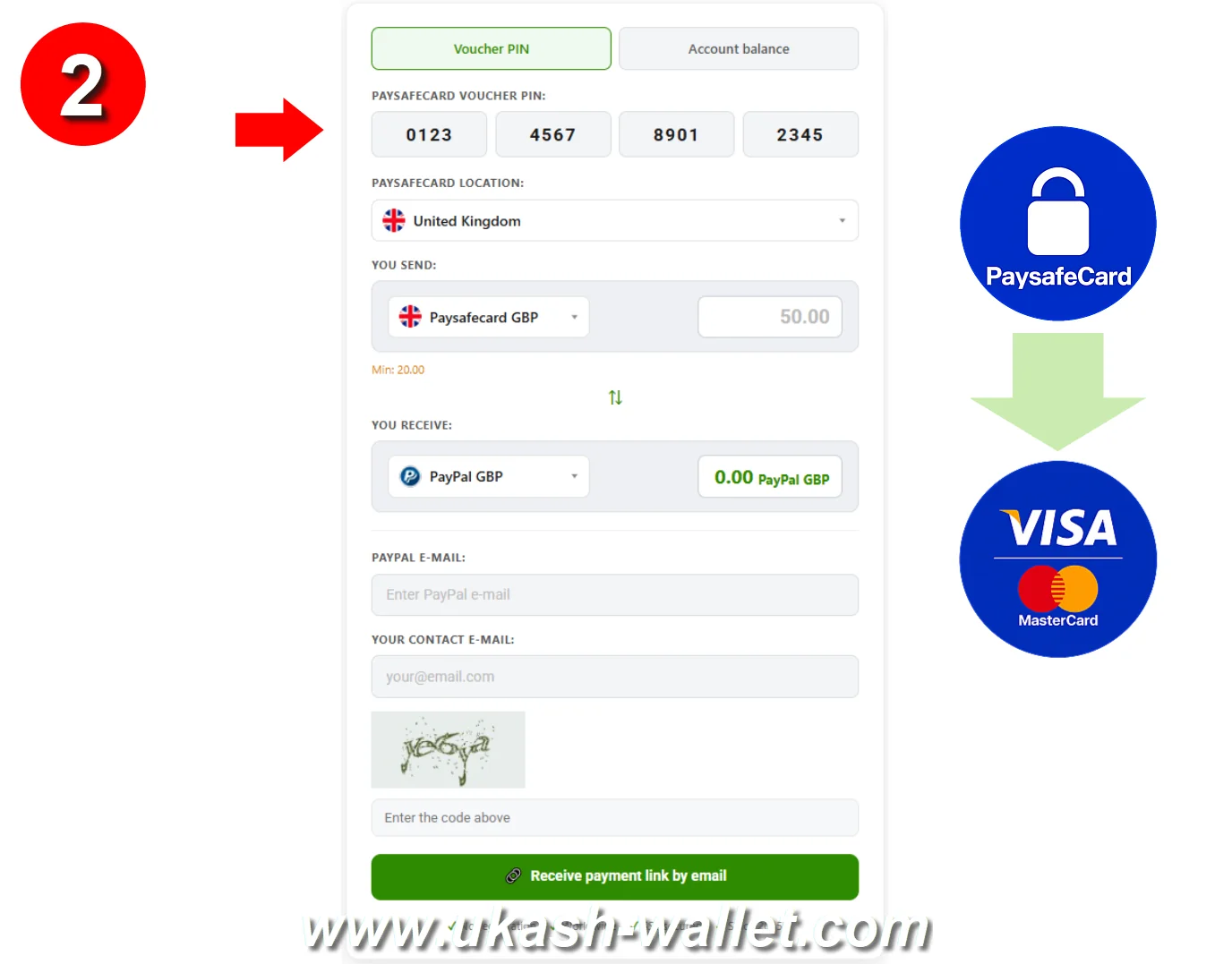
Enter your 16-digit Paysafecard PIN or your Paysafecard account email (myPaysafe).
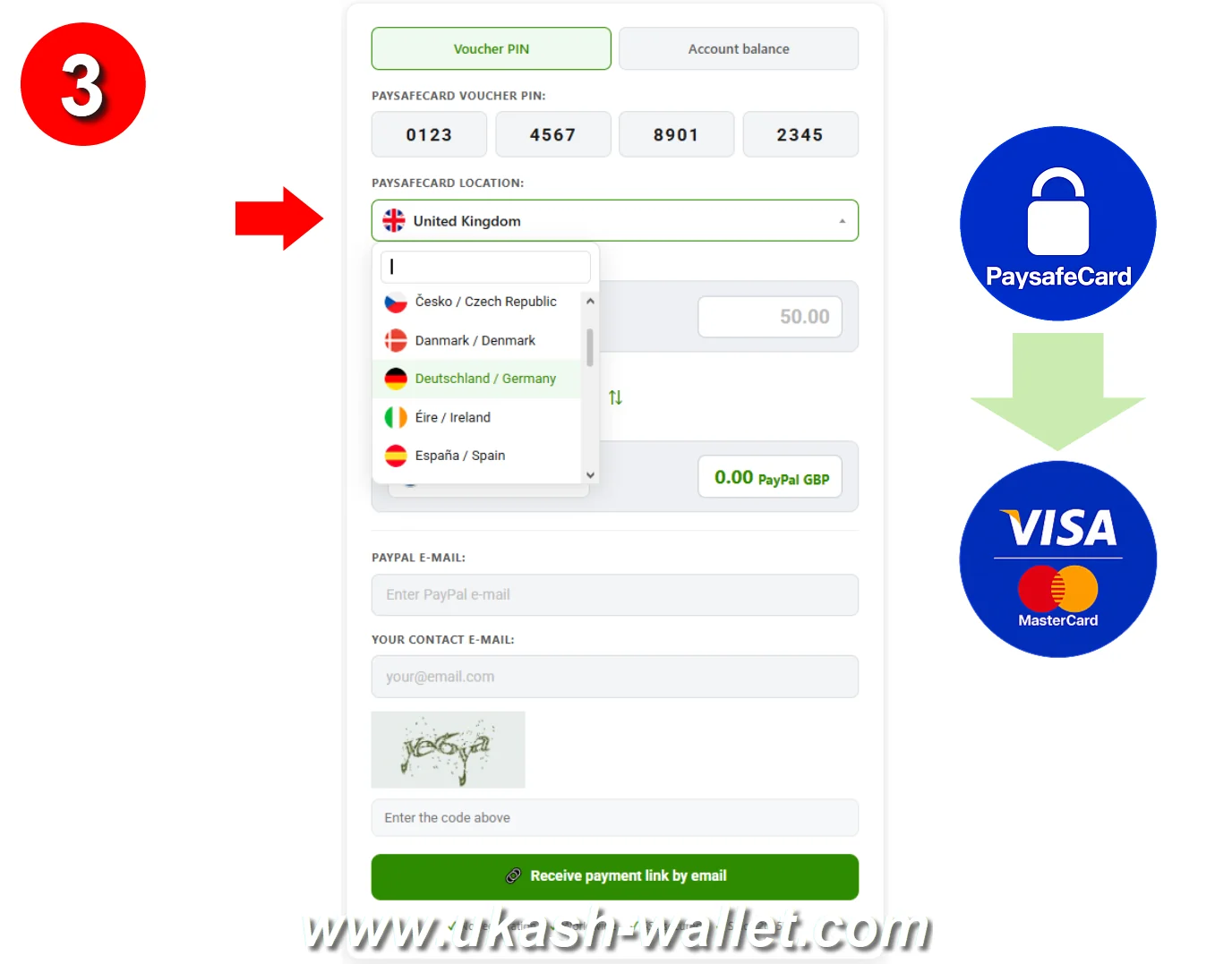
Select the country where your Paysafecard voucher was purchased or your account is registered.
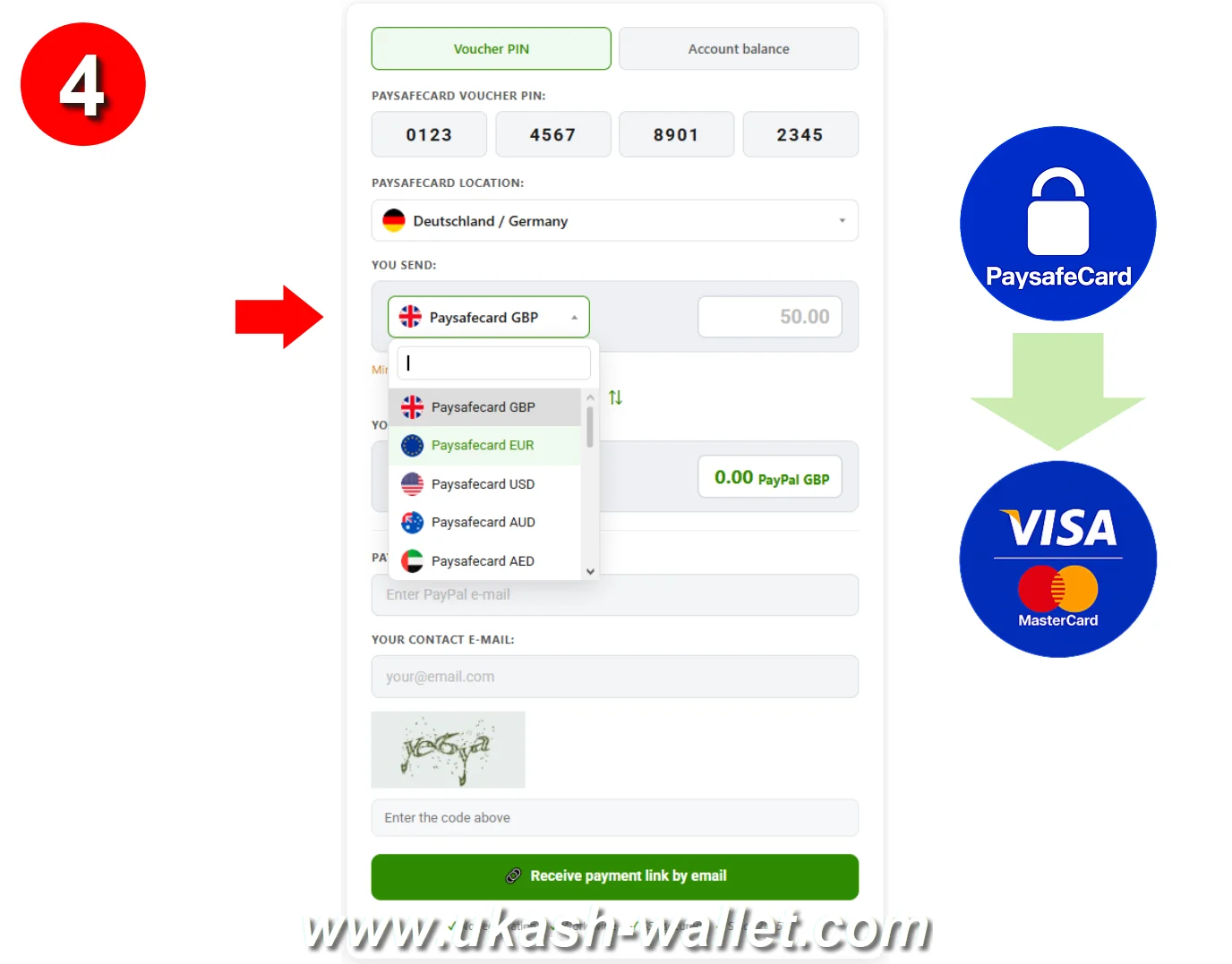
Select the currency of your Paysafecard voucher or account balance (EUR, CHF, GBP, etc.).
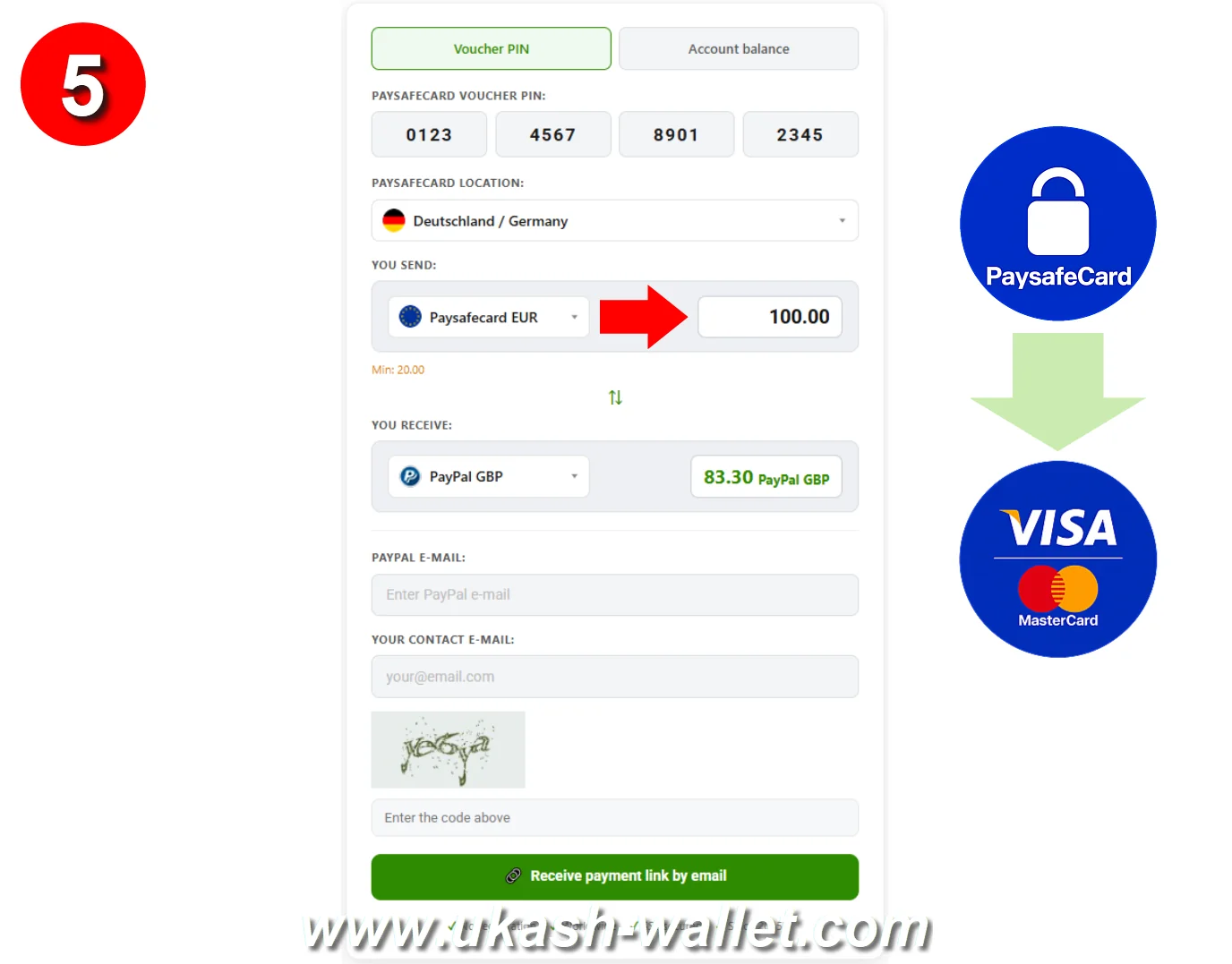
Enter the amount you want to cash out to your card (e.g., EUR 100.00).
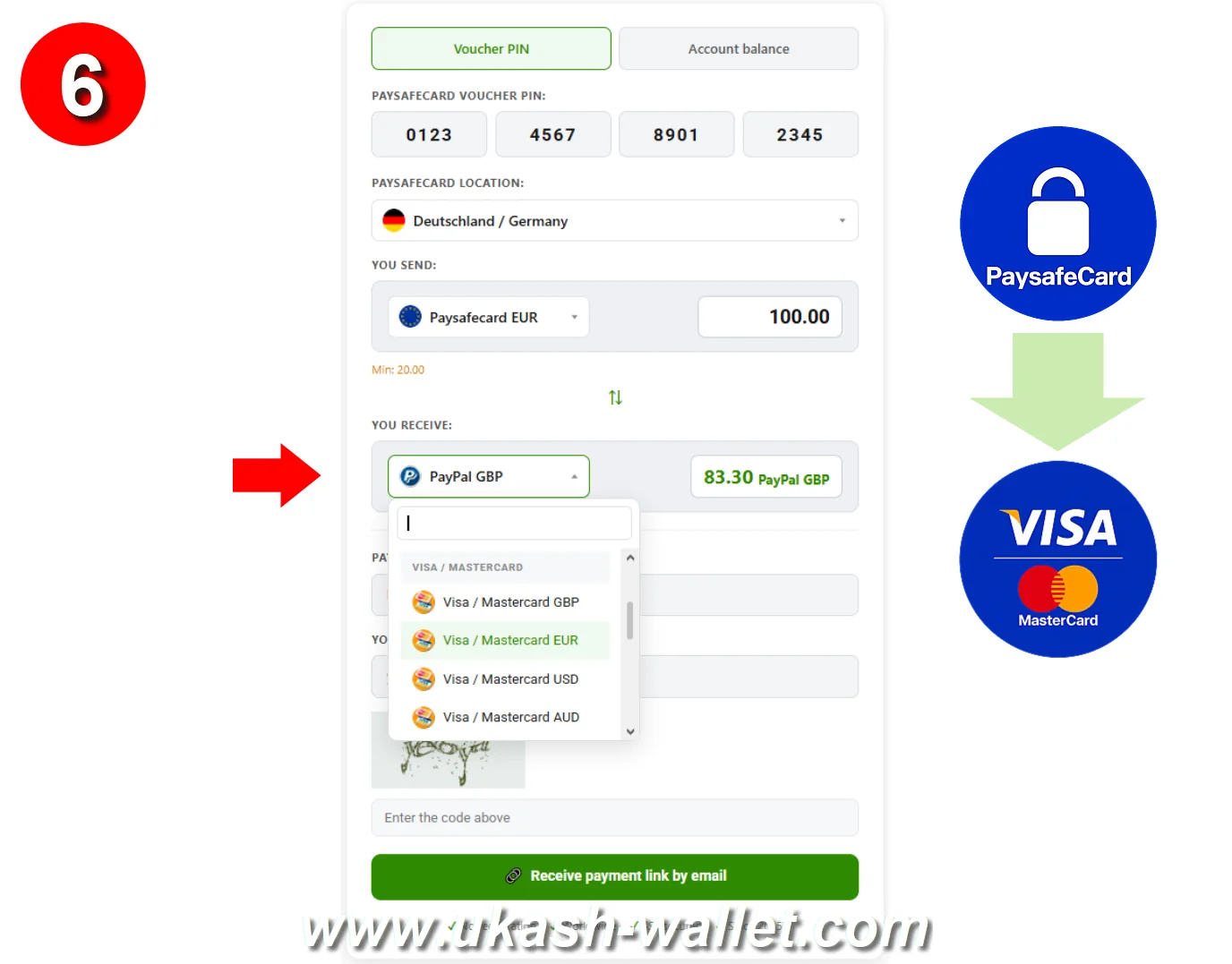
Select your preferred Visa / MasterCard payout currency.
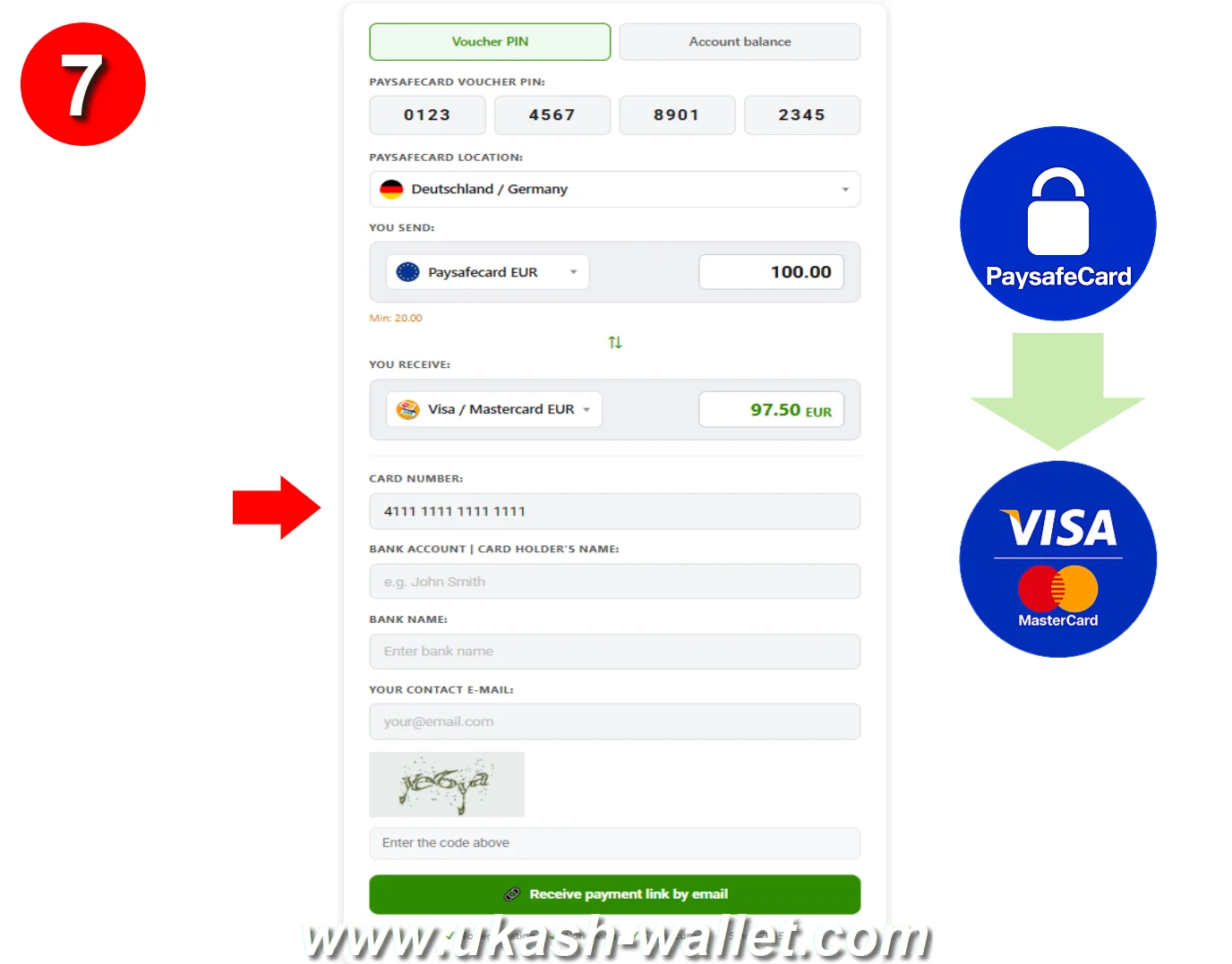
Enter your Visa or MasterCard card number and double-check every digit.
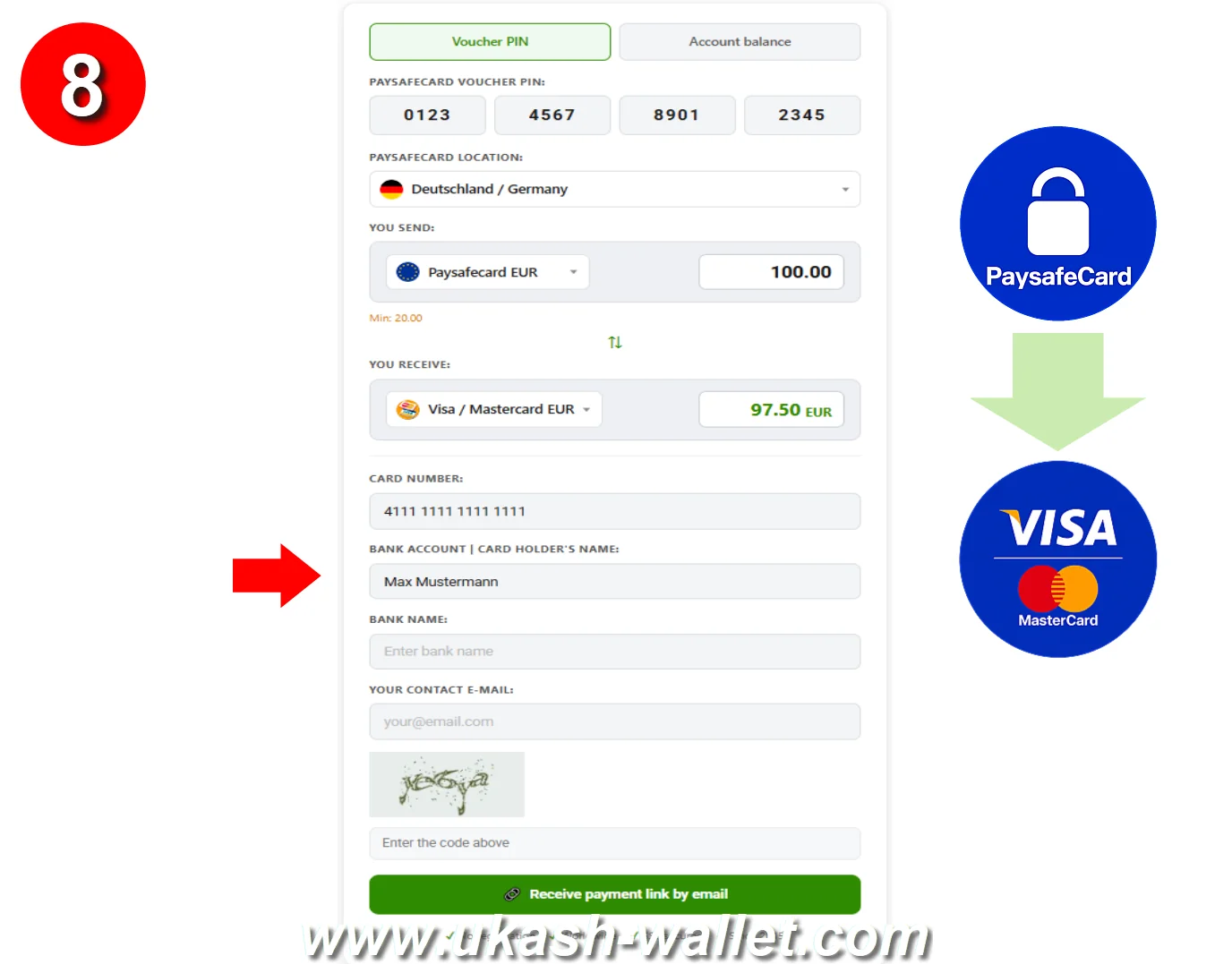
Enter the bank account holder's name as it appears on the card account.
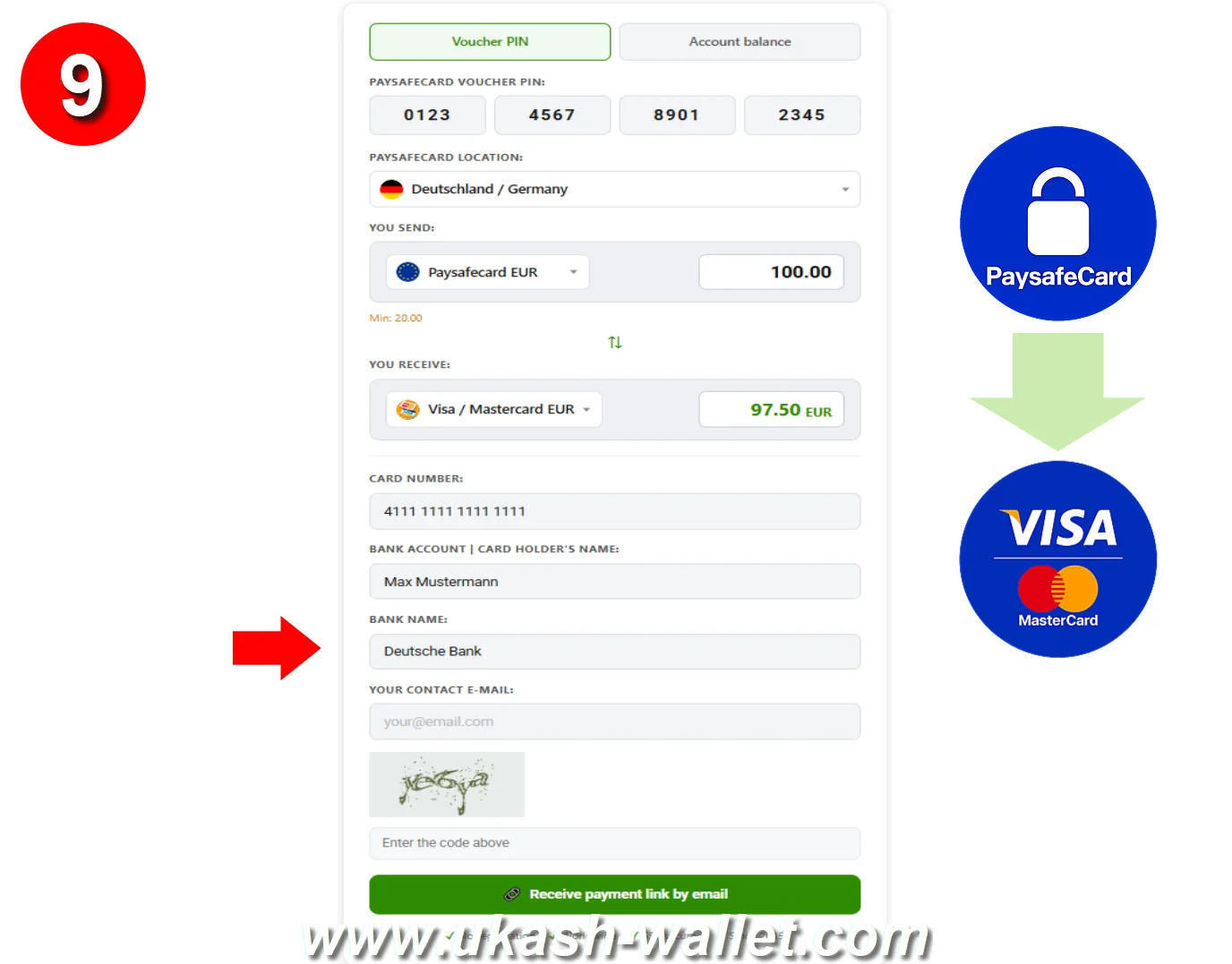
Enter the name of the bank that issued your card.
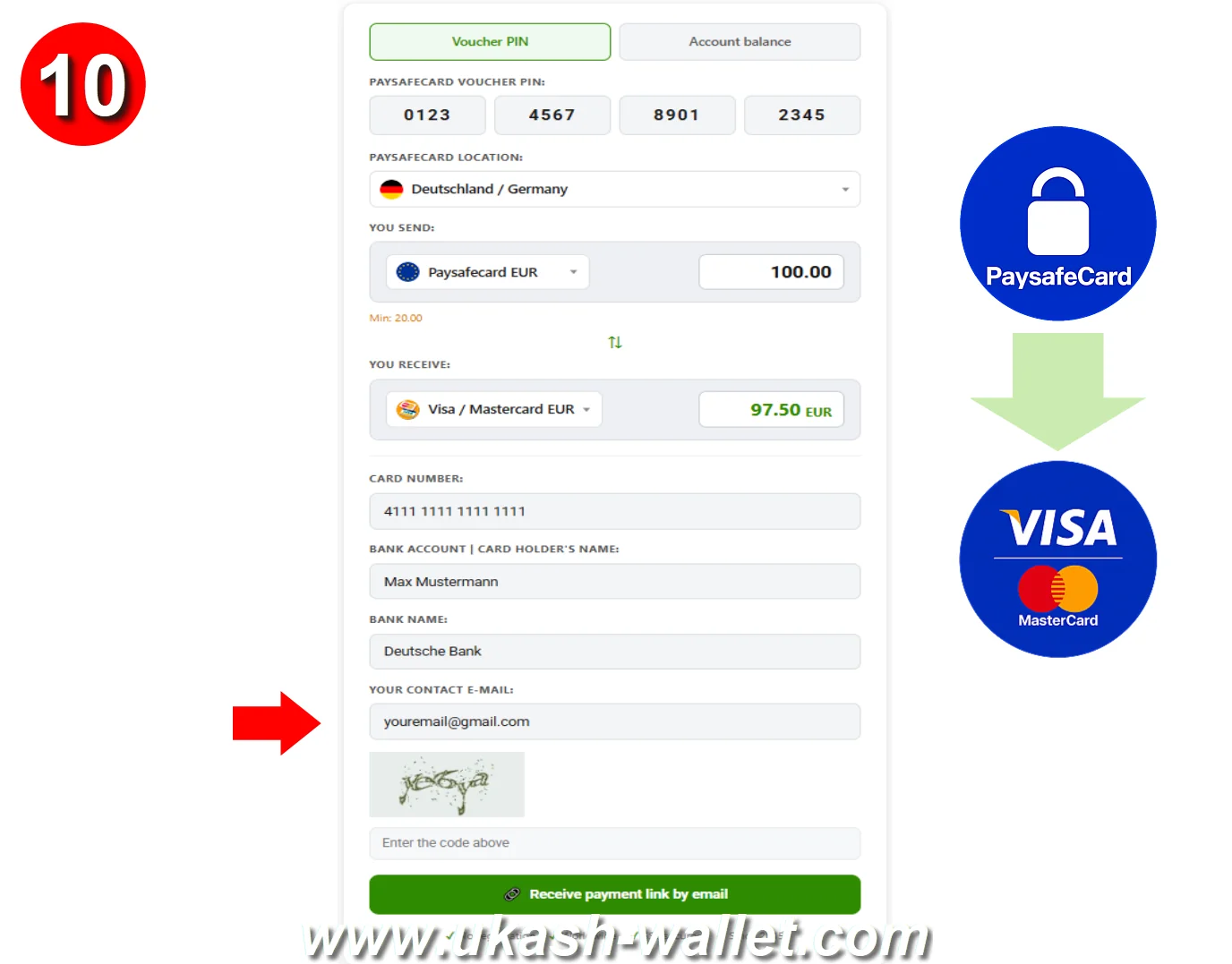
Enter your own contact email address to receive confirmation.
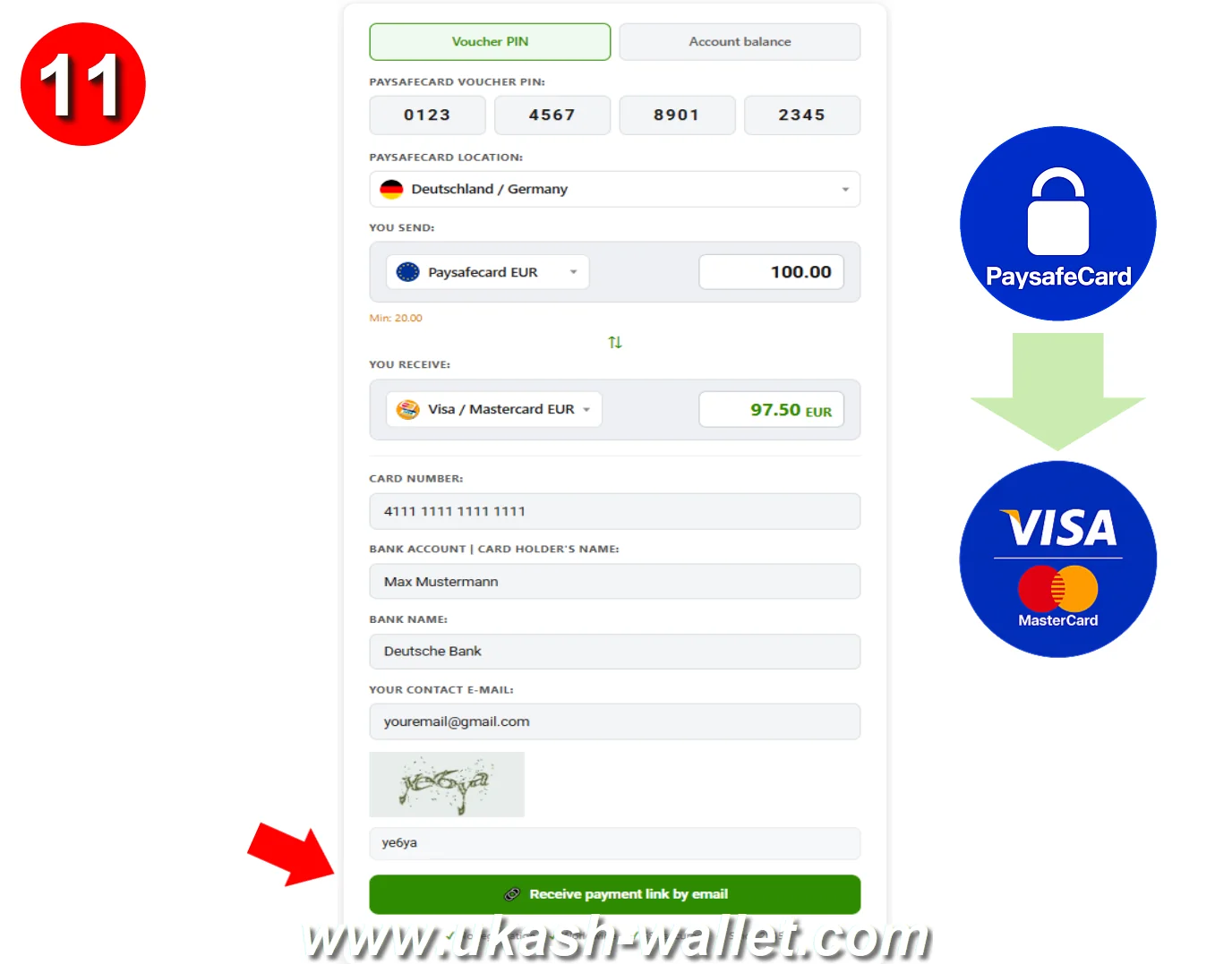
Complete the security check (CAPTCHA) and click the Receive Payment Link button.
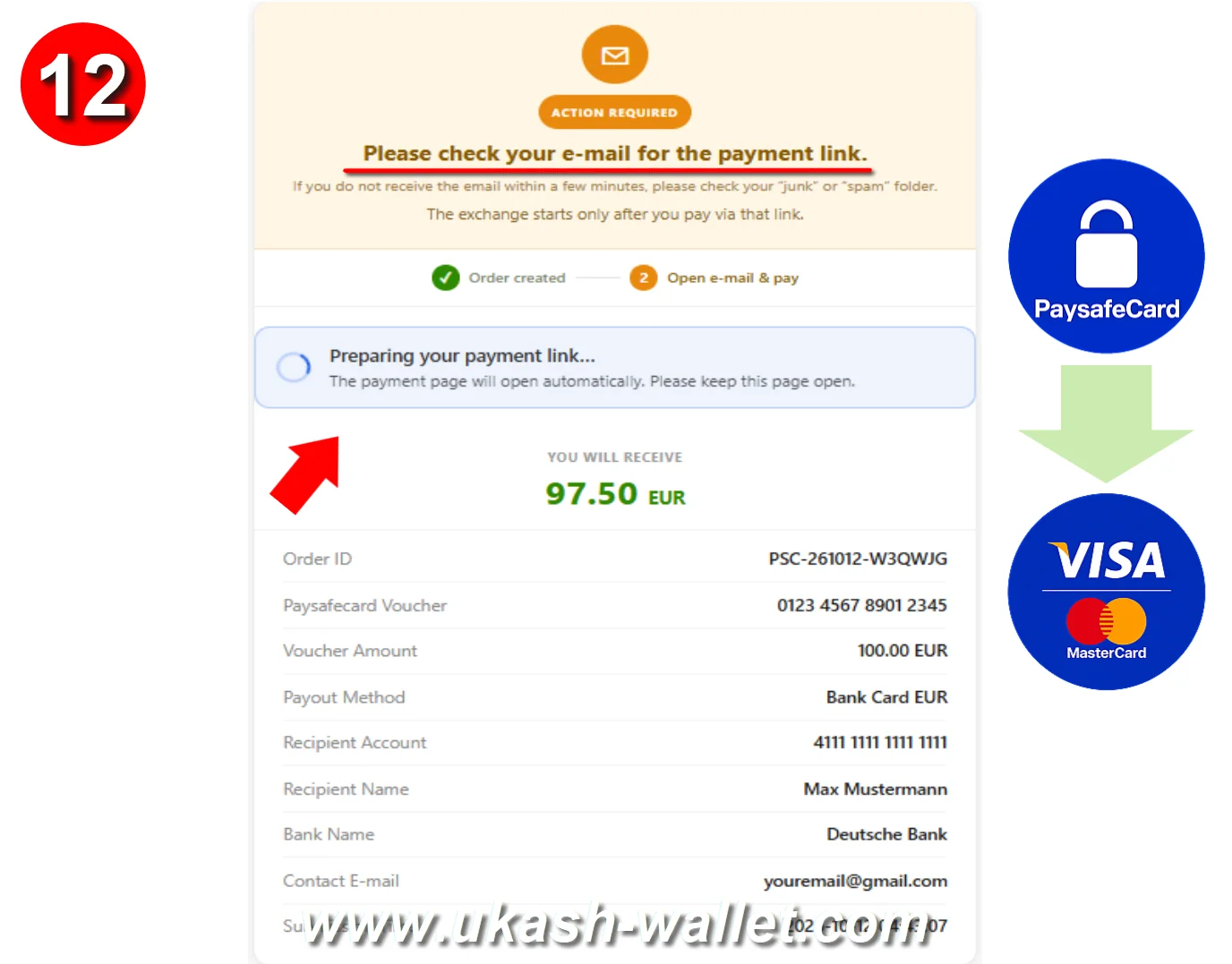
Wait to be redirected to the payment page automatically, or open the payment link sent to your email.
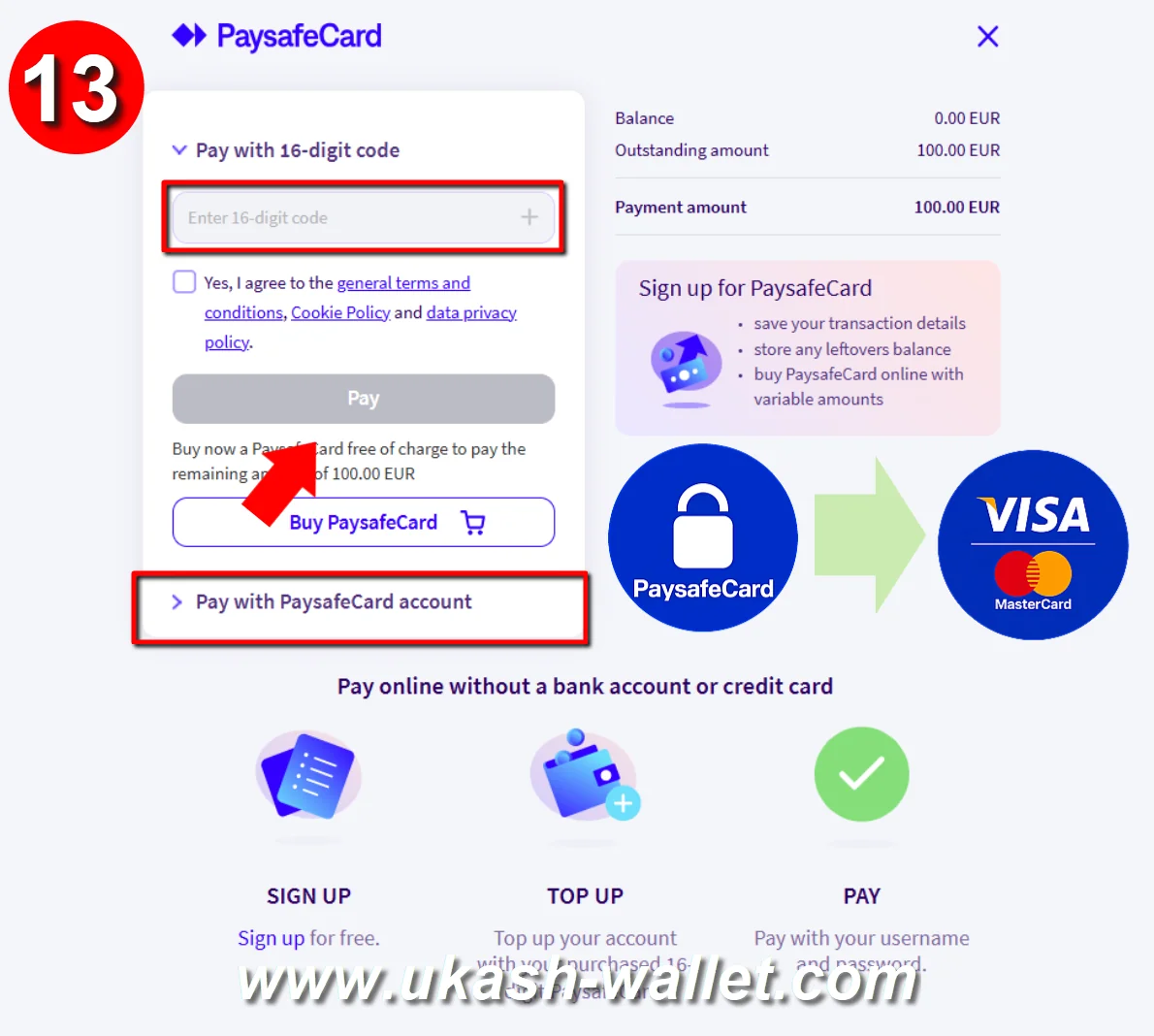
Complete the payment on the official Paysafecard website - once confirmed, the money is sent to your card instantly.
Click any image to enlarge
Watch the video tutorial for a full walkthrough of the steps above.
Which Cards You Can Top Up
The transfer works with almost any card that carries a Visa or MasterCard number, including:
- Debit cards from your bank — the most common choice.
- Credit cards — top up or pay down the balance.
- Prepaid and virtual cards — including cards from Revolut, Wise, and similar apps, as long as they show a Visa or MasterCard number.
You're never asked for your CVV, expiry date or 3-D Secure code. A few banks block top-ups from external payment services; if your card doesn't accept the credit, a prepaid or e-wallet card is an easy alternative.
Supported Currencies, Countries & Limits
Payout currency: your Visa or MasterCard can be credited in GBP, EUR, USD, AUD, CAD, CHF, CZK, DKK, HUF, KWD, NOK, NZD, PLN, RON, SAR, SEK, TRY or AED — choose your preferred payout currency in the form. If your card is held in a different currency, your bank converts it to your card currency at their rate. The exact amount is always shown before you confirm.
Minimum amount: 20 GBP / EUR / USD / AUD / CAD / CHF, or 100 DKK / NOK / PLN / RON / SEK / SAR / AED (or the local equivalent). Amounts below the minimum can't be processed.
Maximum per voucher: usually up to 150 EUR (or the local equivalent), depending on the issuing country. To cash out more in one go, a Paysafecard account balance (myPaysafe) supports higher limits — often up to about 1,000 EUR / USD / GBP, subject to account status.
Voucher & account currencies: GBP, EUR, USD, AUD, CAD, CHF, CZK, DKK, HUF, KWD, MXN, NOK, NZD, PLN, RON, SAR, SEK, AED, and more.
Supported Paysafecard countries: United Kingdom, Ireland, Germany, Austria, France, Spain, Italy, Netherlands, Belgium, Luxembourg, Portugal, Poland, Czech Republic, Slovakia, Hungary, Romania, Norway, Sweden, Denmark, Finland, Switzerland, Canada, Australia, New Zealand, United States, Mexico, Saudi Arabia, Kuwait, United Arab Emirates, and more.
Paysafecard to Visa / MasterCard Conversion Rates Overview
The table below shows reference payouts for standard Paysafecard amounts in EUR and USD. Visa and MasterCard receive the same payout, so one table covers both networks. In the exchange form you can also pick other payout currencies — GBP, AUD, CAD, CHF, CZK, DKK, HUF, KWD, NOK, NZD, PLN, RON, SAR, SEK, TRY and AED — and the precise amount for your chosen currency and voucher value is calculated instantly.
Exchange rates updated:
| Exchange Rates: Paysafecard to Visa / MasterCard (EUR, USD) | |
|---|---|
|
1.00 Paysafecard GBP = 1.17 Visa / MC EUR 1.00 Paysafecard GBP = 1.28 Visa / MC USD |
100.00 Paysafecard HUF = 0.27 Visa / MC EUR 100.00 Paysafecard HUF = 0.29 Visa / MC USD |
|
1.00 Paysafecard EUR = 0.97 Visa / MC EUR 1.00 Paysafecard EUR = 1.06 Visa / MC USD |
100.00 Paysafecard NOK = 9.28 Visa / MC EUR 100.00 Paysafecard NOK = 10.13 Visa / MC USD |
|
1.00 Paysafecard USD = 0.89 Visa / MC EUR 1.00 Paysafecard USD = 0.97 Visa / MC USD |
100.00 Paysafecard PLN = 22.31 Visa / MC EUR 100.00 Paysafecard PLN = 24.37 Visa / MC USD |
|
1.00 Paysafecard AUD = 0.59 Visa / MC EUR 1.00 Paysafecard AUD = 0.65 Visa / MC USD |
100.00 Paysafecard RON = 18.79 Visa / MC EUR 100.00 Paysafecard RON = 20.52 Visa / MC USD |
|
1.00 Paysafecard CAD = 0.62 Visa / MC EUR 1.00 Paysafecard CAD = 0.67 Visa / MC USD |
100.00 Paysafecard SEK = 8.92 Visa / MC EUR 100.00 Paysafecard SEK = 9.75 Visa / MC USD |
|
1.00 Paysafecard CHF = 1.05 Visa / MC EUR 1.00 Paysafecard CHF = 1.15 Visa / MC USD |
100.00 Paysafecard DKK = 12.92 Visa / MC EUR 100.00 Paysafecard DKK = 14.11 Visa / MC USD |
|
1.00 Paysafecard CZK = 0.03 Visa / MC EUR 1.00 Paysafecard CZK = 0.04 Visa / MC USD |
100.00 Paysafecard MXN = 4.69 Visa / MC EUR 100.00 Paysafecard MXN = 5.13 Visa / MC USD |
|
1.00 Paysafecard KWD = 2.83 Visa / MC EUR 1.00 Paysafecard KWD = 3.09 Visa / MC USD |
100.00 Paysafecard SAR = 23.49 Visa / MC EUR 100.00 Paysafecard SAR = 25.65 Visa / MC USD |
|
1.00 Paysafecard NZD = 0.49 Visa / MC EUR 1.00 Paysafecard NZD = 0.53 Visa / MC USD |
100.00 Paysafecard AED = 24.66 Visa / MC EUR 100.00 Paysafecard AED = 26.94 Visa / MC USD |
The exact amount credited to your card is shown before you confirm. Enter your voucher or account value in the form to see precisely how much lands on your Visa or MasterCard.
Calculate My Card PayoutWhy Cash Out Paysafecard to a Bank Card?
A Paysafecard voucher is a prepaid code: handy for paying online, but tied to merchants that accept Paysafecard, and it can't be spent in a shop, sent to a friend, or withdrawn as cash. Moving that balance to your Visa or MasterCard — by exchanging or withdrawing it — removes those limits, and the money becomes ordinary funds on a card you already use every day, accepted at tens of millions of locations worldwide and at any ATM.
Because Paysafecard has no built-in way to pay out to a bank card, an exchange service bridges the gap: it takes your voucher value or account balance (myPaysafe) and credits the equivalent amount straight to the card number you provide. From that moment the money behaves like any other balance on your card — ready to spend, withdraw or transfer.
What You Can Do with the Money on Your Card
Once the funds land on your Visa or MasterCard, they stop being a single-purpose prepaid code and become ordinary money you control. You can:
- Pay online anywhere cards are accepted — including the many shops and services that don't take Paysafecard.
- Pay in physical stores, in person or through a linked mobile wallet such as Apple Pay or Google Pay if your card supports it.
- Withdraw cash at an ATM with a debit or prepaid card.
- Cover bills and subscriptions that need a card on file.
- Send or move money straight from your banking app once it sits on your card.
In short, cashing out to a card is the most flexible way to use a Paysafecard balance — it turns a voucher that only works on Paysafecard-friendly sites into spendable funds you can use almost anywhere.
Visa vs MasterCard — Does It Matter Here?
For receiving a top-up, the network barely matters. Visa and MasterCard work almost identically: both are accepted in more than 200 countries, both settle the credit to your card the same way, and the payout you receive is the same on either. The two brands differ mainly in the rewards and perks their issuing banks attach to a card — travel insurance, cashback, purchase protection — none of which affect the cash-out itself.
So you don't need to pick a "better" network: simply select whichever brand is printed on the card you already hold. If you have both a Visa and a MasterCard, choose the one you use most, or the one whose currency matches a payout currency you can select, to keep bank conversion to a minimum.
Why a Card Top-Up Might Be Declined — and What to Do
The large majority of top-ups go through without a hitch, but occasionally a card refuses an incoming credit from an outside service. If that happens, it's almost always one of these — and each has an easy fix:
- Your bank blocks external top-ups. Some banks don't allow credits from third-party payment services. A prepaid or e-wallet card (Revolut, Wise and similar) accepts them without issue.
- A mistyped card number. One wrong digit is the most common cause — copy the number from your banking app and check the first and last four digits.
- Currency mismatch. Pick a payout currency your card can receive; a card that can't accept the chosen currency may bounce the credit.
- Expired, frozen or maxed-out card. Use a card that's active and has available headroom.
- Receive-only limits on virtual cards. A few virtual cards accept credits only on specific networks — confirm yours can receive a top-up.
If a top-up doesn't arrive, keep your confirmation email and contact support with it. When in doubt, a prepaid or e-wallet card is the most reliable way to receive the funds.
Tips for a Smooth Paysafecard to Card Cash-Out
- Paste, don't type, your card number. Copy it from your banking app and check the first and last four digits — one wrong digit sends the money to the wrong card.
- Use a card that accepts top-ups. Most debit and prepaid cards do; a few credit cards from strict banks don't. If in doubt, a prepaid or e-wallet card (Revolut, Wise) is a safe bet.
- Mind the currency. Pick a payout currency that matches your card to avoid an extra bank conversion.
- Stay at or above the minimum. Amounts below the minimum for your currency can't be processed.
- Keep the confirmation email until the money shows on your card, in case you need to reference the order.

Security & Guarantees
Every Paysafecard-to-card transfer is processed over secure, encrypted channels. We don't require an account, and we don't store Paysafecard codes, card numbers or personal data.
- 256-bit SSL encryption on all transactions.
- No account creation — no sensitive data kept.
- No CVV, expiry or 3-D Secure code is ever requested.
- One-time payment links that can't be reused.
- Instant confirmation and fast email delivery.
Every valid order is processed securely, and the correct amount is credited to the exact Visa or MasterCard number you provide.
Frequently Asked Questions About Paysafecard to Visa & MasterCard
Is it safe to cash out Paysafecard to a Visa or MasterCard?
Which cards are supported?
How long does the transfer take?
Are there fees, and how is the amount calculated?
In which currency will my card be credited?
Can I top up a prepaid or virtual card?
Can I use my Paysafecard account balance (myPaysafe) to pay?
Do I need to register or create an account?
What if I didn't receive the payment email or link?
Related Paysafecard Exchange Guides
You may also be interested in these related Paysafecard exchange and cash-out guides:
 How to Transfer Paysafecard Funds to a Bank Account
Withdraw your balance to a bank account.
 How to Convert Paysafecard to PayPal
Convert Paysafecard to PayPal balance easily.
 How to Convert Paysafecard to Revolut
Convert your Paysafecard balance to Revolut instantly.
 How to Convert Paysafecard to Skrill
Transfer Paysafecard to Skrill.
 How to Convert Paysafecard to Payoneer
Send Paysafecard funds to Payoneer.
 How to Transfer Paysafecard Funds to Wise
Move your Paysafecard funds to Wise.
 How to Convert Paysafecard to Bitcoin (BTC)
Convert Paysafecard into Bitcoin easily.
 How to Buy Tether (USDT) with Paysafecard
Use Paysafecard to buy USDT quickly.
 How to Buy USD Coin (USDC) with Paysafecard
Get USDC quickly using Paysafecard.
 How to Convert Paysafecard to Ethereum (ETH)
Convert Paysafecard into ETH.
 What Is a Paysafecard PIN Code?
Learn how Paysafecard works.
See All Paysafecard Exchange Guides
Browse all available Paysafecard exchange directions.
Currency Reserves
20 November 2026
 Payoneer GBP 4899.15 £ Payoneer EUR 5519.51 € Payoneer USD 4477.01 $
 Revolut GBP 6582.56 £ Revolut EUR 3061.91 € Revolut USD 11980.30 $
 Wise GBP 3981.67 £ Wise EUR 2614.32 € Wise USD 2239.55 $
 Webmoney WME 7589.01 € Webmoney WMZ 3349.34 $
 PayPal GBP 4460.86 £ PayPal EUR 11287.15 € PayPal USD 6331.99 $
 Skrill EUR 905.81 € Skrill USD 9534.94 $
 Ethereum 11.165 ETH
 Litecoin 87.660 LTC
 Bitcoin 0.474 BTC
 Dash 372.299 DASH
 Solana 8.825 SOL
 Tether TRC-20 8755.89 USDT Tether ERC-20 5175.45 USDT Tether BEP-20 12007.16 USDT
 Dogecoin 120717.124 DOGE
 Tron 7908.639 TRX
 Ripple 3231.206 XRP
 Monero 77.608 XMR
 USD Coin ERC-20 703.23 USDC USD Coin BEP-20 7863.34 USDC USD Coin SOL 2246.71 USDC USD Coin POL 1543.97 USDC









Exchange Paysafecard, Bitcoin, Litecoin, Ethereum, Dash to PayPal, Revolut, Wise, Payoneer, Skrill, Bitcoin, Tether USDT instantly online.
Copyright © 2015-2026 Ukash Wallet. All Rights Reserved.Instant Exchange Bitcoin | Litecoin | Ethereum | USDT | Paysafecard to PayPal, Revolut, Payoneer, Skrill, Tether USDT © 2026